☰ home.allCategories
 EU | EN |
 home.welcomehome.signIn / home.register
0 home.cart
EU | EN | home.welcomehome.signIn / home.register
0 home.cart
EU | EN | 0 home.cart
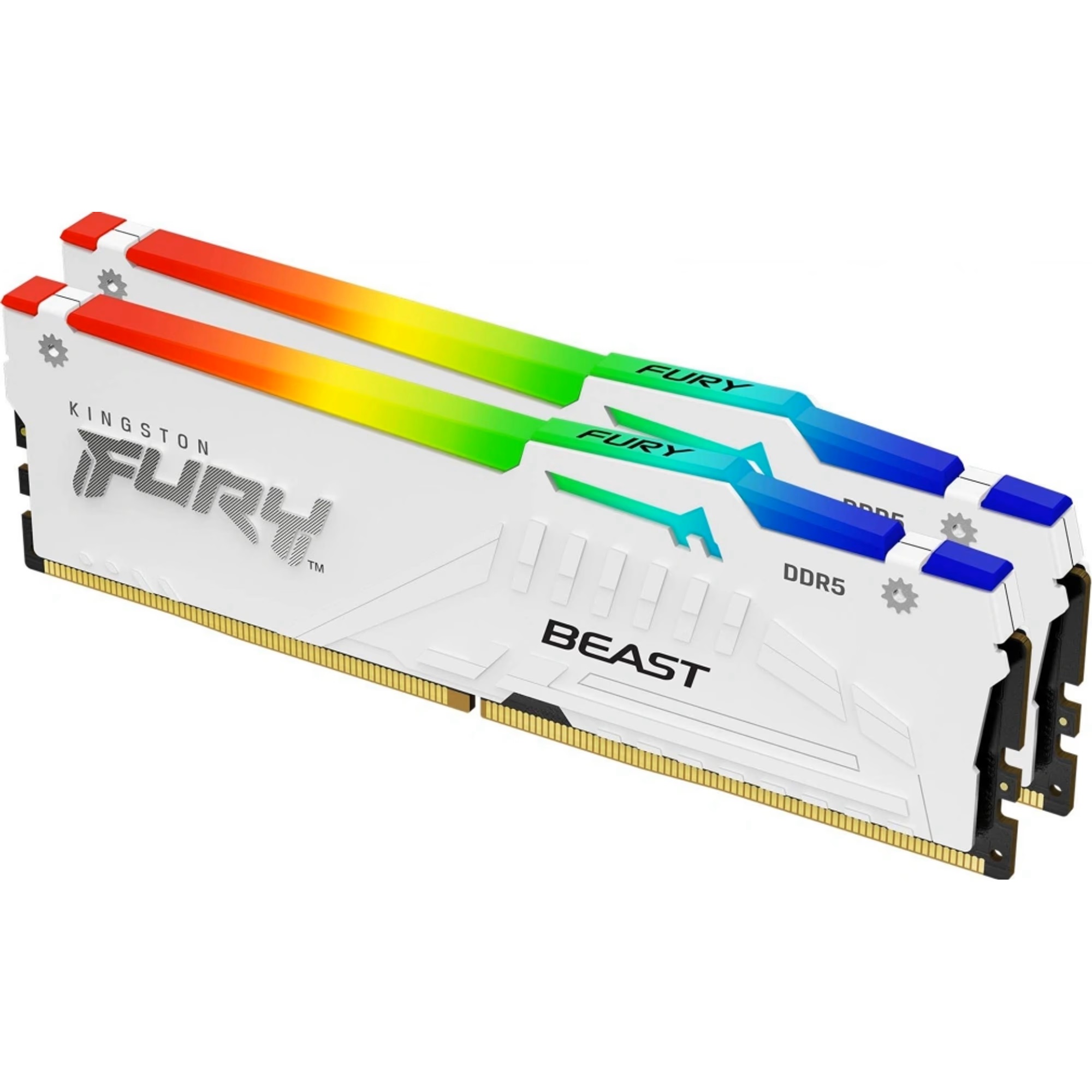
Kingston Fury Beast DDR5 32GB 6000MHz CL36 KF560C36BWE2AK2-32
BeyTechproduct.aboutProduct
product.sku
Czhe-KingstonCL36
product.category
PC Components & Replacement Parts
product.brand
Kingston
product.supplier
Beyston
product.weight
0.1kg
home.listPrice: €240.72
Andorra - €14
Quantity - 1
20 product.inStock
discountCoupon.discountCoupons
product.checkingViewers
product.otherOffersFromSellersOnBeyston
product.description
Kingston FURY Beast DDR5 32 GB (2×16 GB) 6000 MHz CL36 – KF560C36BWE2AK2-32
The Kingston FURY Beast DDR5 32 GB kit offers high-performance memory tailored for gaming, content creation, and high-end desktop systems. With a rated speed of 6000 MT/s and latency of CL36, this dual-channel kit delivers strong bandwidth and responsiveness. Support for Intel® XMP 3.0 and AMD® EXPO ensures easy activation of full performance. :contentReference[oaicite:1]{index=1}
Key Features
- Capacity: 32 GB (2 × 16 GB modules) :contentReference[oaicite:2]{index=2}
- Speed: DDR5-6000 MT/s (PC5-48000) :contentReference[oaicite:3]{index=3}
- CAS Latency: CL36-44-44 @ 1.35 V (EXPO/XMP profile) :contentReference[oaicite:4]{index=4}
- Voltage: 1.35 V for the rated profile; default JEDEC profile DDR5-4800 CL40-39-39 @ 1.1 V :contentReference[oaicite:5]{index=5}
- Form Factor: 288-pin UDIMM modules with heatsinks; height approx. 42.23 mm including spreader. :contentReference[oaicite:6]{index=6}
- Compatibility: Supports Intel XMP 3.0 and AMD EXPO for easy enabling of performance profiles. :contentReference[oaicite:7]{index=7}
- Other Features: On-Die ECC, tested for high-speed performance and backed by a lifetime warranty. :contentReference[oaicite:8]{index=8}
Benefits
- High Throughput & Low Latency: With 6000 MT/s and CL36 latency, this kit provides excellent bandwidth for gaming, streaming, multitasking, and creative workflows.
- Ample Capacity: 32 GB (2×16 GB) is a solid amount for modern systems—enough for gaming plus background apps or light content creation.
- Plug-and-Play High Performance: Just enable the EXPO/XMP profile in BIOS and you're set—no manual tuning required for rated performance.
- Strong Build & Compatibility: Kingston is a reputable brand, and this kit has broad compatibility across modern Intel and AMD DDR5 platforms.
Package Contents
- 2 × 16 GB Kingston FURY Beast DDR5 6000 MHz CL36 modules
- Documentation / Warranty information
Recommended Use & Compatibility Tips
- Ensure your motherboard supports DDR5 memory and the desired speed of 6000 MT/s — check the QVL (Qualified Vendor List) for best results.
- After installation, go to BIOS/UEFI and enable the EXPO or XMP profile to run at the full 6000 MT/s; otherwise, the modules will run at the standard JEDEC speed (e.g., 4800 MT/s). :contentReference[oaicite:9]{index=9}
- For AMD systems, aim for FCLK (Infinity Fabric clock) = ~3000 MHz (1:1 with memory) when using 6000 MT/s to maximize performance.
- Verify physical clearance in your case—module height is approx. 42 mm, which is relatively tall; ensure compatibility with large CPU coolers. :contentReference[oaicite:10]{index=10}
- If mixing memory kits or upgrading later, it’s best to match speed, latency, and module specs—as mixing different kits may cause stability issues at high speeds. :contentReference[oaicite:11]{index=11}
Keywords
Kingston, FURY Beast, DDR5, 32GB kit, 2×16GB, 6000 MHz, CL36, Intel XMP 3.0, AMD EXPO, gaming memory, high-performance RAM