 EU | EN | EU | EN | EU | EN |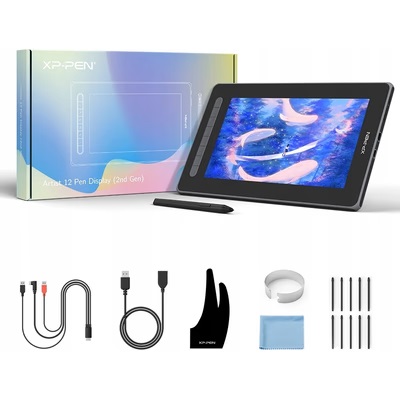
XP-Pen Artist 13
BeyTechproduct.aboutProduct
product.sku
Czhe-Artist13
product.category
Laptops, Tablets & E-Readers
product.brand
XP-PEN
product.supplier
Beyston
product.weight
1.2kg
home.listPrice: €503.66
20 product.inStock
discountCoupon.discountCoupons
product.otherOffersFromSellersOnBeyston
product.description
XP‑Pen Artist 13 (2nd Gen)
The XP‑Pen Artist 13 (2nd Gen) is a 13.3‑inch pen display drawing tablet designed for digital artists, illustrators, students and creative professionals who want to draw directly on screen. It offers a high‑resolution Full HD display, a battery‑free stylus with advanced features, and a compact size ideal for a desktop or mobile workspace. :contentReference[oaicite:1]{index=1}
Key Specifications
- Display Size: 13.3″ diagonal (active area approx. 293.76 × 165.24 mm) :contentReference[oaicite:2]{index=2}
- Resolution: 1920 × 1080 (Full HD) :contentReference[oaicite:3]{index=3}
- Screen Technology: IPS‑ADS, fully laminated to reduce parallax (minimal gap between pen tip and on‑screen cursor) :contentReference[oaicite:4]{index=4}
- Color Gamut / Accuracy: ~130% sRGB, ~96% Adobe RGB, ~92% NTSC for some units. :contentReference[oaicite:5]{index=5}
- Stylus / Pen: Battery‑free EMR pen, **8,192 levels** of pressure sensitivity, **tilt support** (up to 60°) :contentReference[oaicite:6]{index=6}
- Initial Activation Force / Precision: Very low initial activation force (IAF) ~3 g and very short retraction distance ~0.6mm in X3 Smart Chip models. :contentReference[oaicite:7]{index=7}
- Report Rate / Resolution (Tablet Sensor): ~5,080 LPI resolution; report rate “≥200 RPS” for stylus input. :contentReference[oaicite:8]{index=8}
- Shortcut Keys: 9 user‑customizable shortcut keys on the display. :contentReference[oaicite:9]{index=9}
- Ports / Connectivity: Dual USB‑C ports (one for connectivity/power) and sometimes a 3‑in‑1 cable solution (USB‑C + USB‑A + HDMI) depending on region and bundle. :contentReference[oaicite:10]{index=10}
- Compatibility: Windows 7 or later, macOS 10.10 or later, Android (USB 3.1 / DP1.2), Chrome OS 88 or later, Linux (selected distros) :contentReference[oaicite:11]{index=11}
Highlights & Features
- **True “draw‑on‑screen” experience** — since it’s a pen display, you draw directly on the image surface, which many artists prefer over non‑display tablets.
- **High pen sensitivity + tilt** — the 8,192 pressure levels plus tilt support make shading and natural brush strokes more accurate and enjoyable.
- **Fully laminated display** — reduces visual cursor‑tip offset (parallax) and gives a more natural feel. :contentReference[oaicite:12]{index=12}
- **Compact size** — 13.3″ is large enough for serious work yet small enough for a portable or space‑efficient setup. Excellent for creatives who move or work in small spaces.
- **Color‑accurate display** — With wide gamut support, it’s suitable for illustration, digital art, photo editing and color‑sensitive work. :contentReference[oaicite:13]{index=13}
- **Stylus tech improved (X3 chip)** — smoother pen action, better responsiveness and low latency/bounce, especially in the 2nd Gen version. :contentReference[oaicite:14]{index=14}
Considerations & Limitations
- Because this is a display tablet, you still need a computer (or in some cases a compatible Android device) to power it — it doesn’t work standalone like some tablets. :contentReference[oaicite:15]{index=15}
- The required cabling (especially “3‑in‑1” USB‑C/HDMI/USB‑A in some bundles) may limit portability or require multiple ports/adapters. Users on laptops with limited ports should check compatibility. :contentReference[oaicite:16]{index=16}
- Some users report driver issues, lag or compatibility hiccups depending on system configuration. Example: > “I just got myself an Artist 13 2nd gen … when I start my PC it works just fine. After about a minute however it becomes unusable due to the lag.” :contentReference[oaicite:17]{index=17} It appears conflicts with other software (e.g., VR or display drivers) may cause problems.
- While compact and portable for a display tablet, 13.3″ still occupies significant desk space and is heavier/bulkier than smaller pen tablets. Load high‑res work, and you’ll still need a capable computer.
- The price is higher than non‑display tablets (i.e., pen tablets without screen) so if you don’t need drawing directly on screen, a non‑display option may offer better value.
Conclusion
The XP‑Pen Artist 13 (2nd Gen) is a solid, mid‑sized pen display drawing tablet offering excellent features for its class: direct screen drawing, high pen resolution and tilt, color‑accurate display, and compact ergonomics. It is especially well suited for digital illustration, comic art, photo retouching and mobile creative workflows. If your workflow involves drawing directly on screen and you value portability plus professional features, this is a very good choice.
However, if your budget is tight, you primarily work on large canvases, multi‑monitor setups, or you don’t need to draw directly on screen, you could consider alternatives (e.g., larger displays or cheaper non‑display tablets). Also be sure your computer/laptop has adequate ports and compatible drivers to avoid hiccups.
Keywords
XP‑Pen Artist 13, 13.3‑inch pen display, drawing monitor, 8192 pressure levels, tilt stylus, fully laminated screen, color‑accurate display, compact drawing display tablet